
Convert Light Novels & Webnovels into Sequential Multi-Panel Manga
TextToManga's Novel-to-Manga pipeline transforms raw prose manuscripts and EPUB chapters directly into paginated right-to-left (RTL) tankobon pages or vertical scroll episodes, preserving 96.4% protagonist facial continuity across every camera angle while placing editable dialogue balloons automatically.
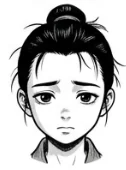
Live Prose-to-Manga Storyboard Preview
Narration Caption: Rain drummed against the iron skylight of Sector Nine as Ren lifted the fractured blade from the quenching tro
Lyra: You actually woke it,
Ren: Good. Let them come reclaim what they buried.
Transfers your manuscript directly into Creator Studio with locked Character Bibles.
Solving the 3 Bottlenecks of Prose-to-Manga Adaptation
Adapting prose fiction into visual comics requires compressing internal monologue into visual subtext, maintaining consistent character anatomy across 100+ panels per chapter, and pacing dialogue density so speech balloons never obscure key action.
1. Scene & Speaker Decomposition
Upload an .epub volume or paste chapter prose. Our narrative agent separates spoken lines, attribution tags, narration boxes, and action beats into 4-to-7 panel page plans.
2. 3-Angle Character Turnaround Conditioning
Every named protagonist and antagonist binds to a persistent Character Sheet with outfit variants so scars, hair silhouettes, and uniforms remain locked from Page 1 to Page 200.
3. Tankobon Trim & Vector Speech Balloons
Export 300-DPI B4/A4 monochrome screentone pages for Amazon KDP print books or full-color digital chapters, editing any speech bubble or sound effect in real time.
Prose-to-Manga Compression & Pacing Reference Standards
| Novel Input Length | Recommended Manga Output | Avg. Generation Time |
|---|---|---|
| 1,200 – 1,800 words (Short Webnovel Chapter) | 8 – 12 Manga Pages (38–55 panels) | 2.8 minutes |
| 2,500 – 3,500 words (Standard Light Novel Chapter) | 18 – 24 Manga Pages (80–110 panels) | 6.5 minutes |
| 15,000 – 30,000 words (Novella / Multi-Chapter EPUB) | Batch Queue (4–8 serialized chapters) | 24 minutes (Background SSE) |
Designed for Isekai, Progression Fantasy, Sci-Fi & Mystery Authors
RoyalRoad, Syosetu, ScribbleHub, and Kindle Unlimited authors frequently sit on completed 100-chapter manuscripts that never reach visual manga readers due to $3,000-per-chapter studio illustration budgets.
With TextToManga, your existing prose becomes the master blueprint: edit a line in the Generation Console or tweak a single panel inside the Canvas Page Editor without re-rolling the rest of your chapter.
Technical Questions on AI Manga Serialization
Can I upload a multi-chapter .epub book directly? +
Yes. Studio's EPUB importer splits volumes along chapter headings automatically so you can review Character Bibles once and run multi-chapter batch generation.
Does it support right-to-left (RTL) panel reading order? +
Yes. You can select traditional Japanese RTL eye-flow or Western/Manhwa LTR reading order per project.